Showing posts with label aether3d. Show all posts

2018-06-19

Optimizing Metal graphics and compute code on an iPad Pro

TL;DR: I got Sponza scene with 2048 point lights running on an iPad Pro at 60 FPS.

My engine has supported Metal for a long time, but I haven't really optimised the Metal renderer before. In this post I go through the process of optimizing Sponza scene with 2048 dynamic point lights from non-interactive frame rates to 60 FPS on an iPad Pro 10.5". I learned a lot and wanted to share my learnings.

Apple's profiling tools

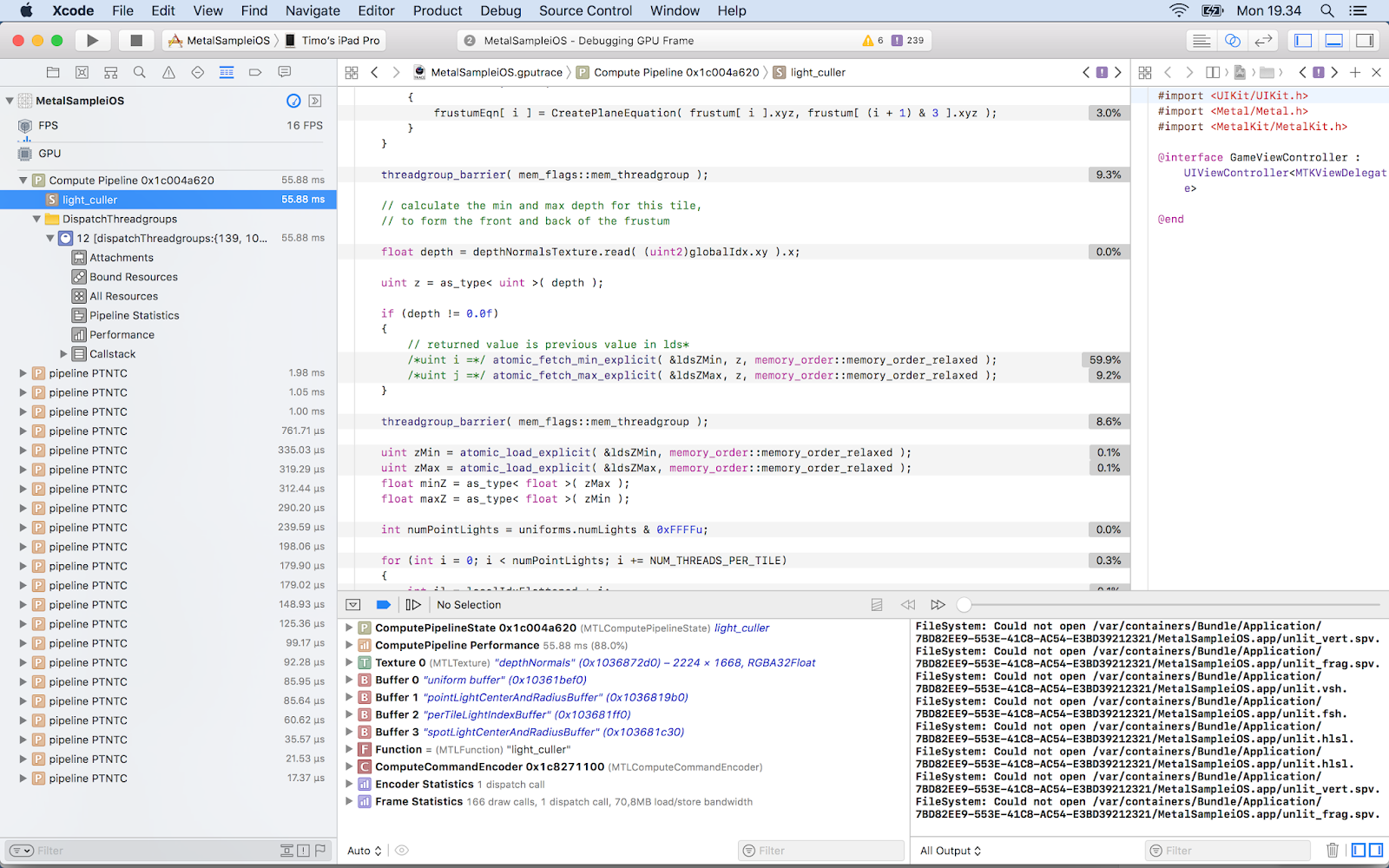
I started my optimisation journey by taking a GPU frame capture in Xcode. Right away I saw that Apple has added a lot of useful features that were missing or less informative in the past. I was delighted to see that it now has GPU counters, timings on source lines and optimisation tips ("Remarks"). Setting a conditional breakpoint to capture a GPU frame at a fixed frame number got me slightly more consistent results than randomly pressing the capture button. A very good feature is the ability to edit a shader during the capture and see the results without restarting. Xcode and its associated tools are still buggy and crash often. I also often got an annoying "No capture boundary detected" error.

Initial capture

 The starting point doesn't look good, 16 FPS. My Forward+ light culling takes a whopping 55.95 ms and uses 3 600 628 000 ALU ops. Let's see what we can do. From the source line timing view I saw that calculating minimum and maximum z-value for a tile is very slow (59.9 %):


Optimization

What if I don't use depth bounds? Light culling now takes 13.53 ms and 2 234 827 000 ALUs, and I already got 60 FPS. But let's not stop here! I watched the excellent WWDC 2016 talk Advanced Metal Shader Optimization . Xcode's Remarks section warned about buffer preloading. I tried to fix them but couldn't find a way.  My first optimisation was to provide the horizontal and vertical tile counts as uniforms instead of calculating them in the shader. Percentage for those code lines decreased from 1.8 % to 1.4 % and ALU from  2 234 819 000 to 2 208 126 000. The WWDC video suggested to use shorts instead of ints: 2 205 648 000 ALUs.

Future

There's a lot of room for improving the results further, and it's needed. I didn't focus on my material shader in this post because my current engine's shading model is not yet physically based unike my old engine's and I'm not using post processing effects. I use floats in many places where a half would do. I also don't use texture compression, but my engine already supports ASTC so it's just a matter of encoding Sponza textures. My light culler could use parallel reduction or clustered culling.
Metal 2 has some features that could help, like tile shading, function specialization, resource heaps and argument buffers. My plan is to study them next, the concepts are already familiar to me from other graphics APIs. The engine is open source and can be downloaded from GitHub.

2016-08-20

How a frame is rendered in Aether3D?

Aether3D is a component-based game engine supporting modern rendering APIs. Currently there is no lighting, but I'm porting my Forward+ implementation to it soon. While there is no lighting at the moment, there are directional and spot light shadows. In this post I will run through steps to render one frame.

Scene object contains GameObjects. GameObjects containing component types SpriteRendererComponent, MeshRendererComponent and TextRendererComponent will be rendered by those GameObjects that contain CameraComponents. Cameras can render into the screen or into a render-texture. If DirectionalLightComponent or SpotLightComponent has its shadow-flag enabled, those will cause a special camera to render their shadow maps.


Rendering steps:

1. Scene.Render()


This method first does housekeeping work needed to render a frame: resets statistics, begins a new render pass, acquires the next swapchain image depending on API etc.

Then it calculates an axis-aligned bounding box for the whole scene (needed for shadow frustum calculation) and updates transformation matrix hierarchy.

Then it collects game objects with camera components into a container and sorts it depending on camera type (render-texture, normal) and its layer etc.

2. Scene.RenderWithCamera()


First, render-texture cameras are looped and this method is called, once for a normal camera and six times for a cube map camera. Then, shadows are rendererd. Finally, cameras rendering directly into the screen are rendererd. If any cameras also want to render depth and normals into a texture (can be used later in post-processing and lighting effects), it's done after this step.

Camera's clear flag is applied at the beginning of this method (clear color, clear depth, don't clear).

At this point, skybox is rendered.
Then, camera's frustum is calculated.
Now game objects are looped and objects containing sprite renderer or text renderer are rendered. Mesh renderer objects are collected and sorted by their distance, then rendered. They reference a Material which feeds the blending state, culling state, shader and uniforms into the renderer.

3. GfxDevice::Draw()


Everything that's rendered uses a method from GfxDevice namespace:
void ae3d::GfxDevice::Draw( VertexBuffer& vertexBuffer, int startIndex, int endIndex, Shader& shader, BlendMode blendMode, DepthFunc depthFunc,
                            CullMode cullMode )


This method first calculates a pipeline state object (PSO) hash and if it's not found in cache, it creates a new PSO.
On Vulkan and D3D12 renderer, descriptor set is filled with draw parameters and the actual drawing uses vkCmdDrawIndexed() or DrawIndexedInstanced(). 

Future work

There is room for improvement, as the engine is still in its early stages (v0.6 under development).

1. PSO objects are expensive to generate so it would be better to generate them before the main loop.
2. There is no instancing support yet.
3. Too little profiling done so far as the main goal has been to get things to work on all APIs (Vulkan, OpenGL, Metal, D3D12).
4. Handling transparency, this is actually currently in development.

2015-12-25

Aether3D Status Report

I've been busy at work this fall so I don't have time to work on my own engine as often I'd like to. Anyways, I'm happy to share that I now have a working Metal renderer (both iOS and OS X). Using MetalKit I can do the view setup identically on both operating systems and there are very few different code paths. D3D12 renderer is progressing well. I'll also implement Vulkan renderer as soon as public implementation becomes available.

VR rendering needs more love. I'm naively rendering the scene twice. For example culling and shadow rendering can be done only once. I don't have my own HMD yet but borrow my employer's DK2 sometimes. I'll also add Vive support as soon as possible. I started making a VR game on Unreal Engine to get to know VR and Unreal better. It's a System Shock inspired space ship exploration game. The plan is to utilize Vive's controllers or Oculus Touch to interact with computers, drawers etc.

When implementing new APIs I'm focusing first on getting things working and later making the implementation as efficient as possible. For example, I'm using only one command list in my D3D12 renderer but will add more soon.

Visual Studio's and Xcode's frame capture has been very useful in debugging these new renderers and to make things easier I've added debug names to every API object.

Next year I plan to hit Aether3D 1.0 (0.5 is now under development).

2015-05-16

What I've been doing recently

I've been adding graphics features into my new engine slowly because I don't want to write a lot of code that will be replaced by newer APIs. Regarding that, I made an iOS branch into GitHub and I'm learning Metal and already got a textured quad to render. So far the best resource for learning has been http://metalbyexample.com. I also installed Windows 10 preview and VS 2015 RC into my secondary laptop and are learning D3D12. When I have more experience on D3D12 and Metal, I'll merge my renderers into the master branch. I'm also waiting for Vulkan and reading Mantle documentation until it's out.

Writing only engine code would not be so productive, so I'm working on two small games at the moment. The first one is a desktop FPS made using Unity 5.

Some of the assets are downloaded from sites like https://freesound.org, pamargames.com and cgtextures.com but some are done by myself. While the level design/art design/balancing is amateurish, I'm paying special attention to polishing feedback like dealing/receiving damage, transitions, sounds, bullet holes etc. When the game is ready, I'll put the player into my website along with the project folder. I also ditched the built-in MonoDevelop in favour of Xamarin Studio which is faster, but Unity overrides my formatting options.

My other game under construction is a roguelike using my own engine.

I haven't decided on the final design or platform. If my iOS/Metal renderer advances quickly, it would be nice to test the game on my iPhone 5S. Using my own engine for a game development has been productive since it has uncovered some bugs that would have bitten me later on otherwise. Also the new engine's component-based game object system has been nice to use in this game. Some of the used components are TextRendererComponent, SpriteRendererComponent, TransformComponent and AudioSourceComponent.

Next steps in my engine will be a virtual filesystem which enables faster load times by packing multiple files into one. While making the iOS port I'll also be writing NEON SIMD matrix operations. I'm also making a multi-platform scene editor using Qt and its first version will be included in the next engine release.

2014-12-30

Planning Aether3D Rewrite For 2015

In 2015 spring I'll rewrite my engine again.

It's that time again, the moment when I look at my engine, started in 2013, and an accumulated list of architecture improvements that are easier to put into a completely new engine instead of shoehorning them into the current engine. I know that rewriting is a thing you should never do, but I am quite satisfied with the current engine and can take many things into the new engine. Refactoring could get my current engine into the right direction, but some of the things I want are just too big for current architecture.

Rationale:

Static linkage/getting rid of virtual methods


My current engine's whole API is exposed as virtual methods, but I want to use them only where it really makes sense. Static linkage also makes configuration easier, not having to worry about DLL's location or format.

Singletons/global state


Current engine has some, but I want none.

Entity-Component System


I want to compose game objects by combining components like in Unity. Separation of Concerns FTW.

Memory labeling/profiling


I want to have a breakdown of memory used by a game, asset by asset. That means custom allocators, which will come handy because...

Minimizing dynamic allocation


I want to have a data-oriented cache-friendly design. When I create a texture, I want to get an index into a texture pool that was allocated on startup. I will analyze my main loop and minimize dynamic allocations. I will also check cache-misses.

API inside a namespace


My current engine's public API doesn't use namespaces, so collisions are possible. Not so in my next engine.

More const-correct design


While my current engine is mostly const-correct, more objects and state could be made immutable, making reasoning about program's behaviour easier.

Compute shaders aren't exposed


My current engine uses them internally for light culling, but I want to give the power to you, the user.

Post-Processing Effects can be pulled out


Separation of Concerns, baby. Unity has them as a separate package, I want to have them out of engine core, too.

AZDO


Maybe not full-on, but definitely something to strive for.

Updated Renderer APIs


Exact versions can vary, but I aim for OpenGL 4.5, GLES 3.1, D3D11.1 and Metal. Need to figure out something for OS X, maybe 4.1.

Editor


Many open-source engines have editors that contain basic usability problems that are easy to fix. I have been prototyping a custom scene editor using Qt 5 for several months and believe I can make an editor that's not painful to use. The editor will be in sync with the engine and support new features as soon as they are implemented. It is by no means necessary to use the editor, the engine works without it, too.

GitHub


The whole building of the new engine will happen on GitHub, right from the start. It gives the engine discoverability and easier management of issues/documentation/wiki etc.

Dogfooding

I want to have a real use-case for every feature I add to the engine. A simple game, a demo, whatever, just something real, released stuff.

Schedule


I will do research until GDC 2015 (March 2-6) and a few weeks after that I plan to make the first commit to GitHub.

2014-11-01

Use That Profiler

I was on a long bus trip and was bored, so I launched Xcode and worked on my game prototype. I wanted to see its memory usage so I opened Instruments Allocator tool. I noticed something strange, multiple OpenGL buffer creation calls on every frame. I figured out it must be in RenderQueue class because the screen was only showing 2D stuff:
But my render queue only creates GL buffers when it's full! Turns out I emptied the queue element container always after drawing, causing the next draw to generate it again. The solution was to let the container grow and reuse old elements. This bug has been in my engine since the beginning and only after actually starting to make a game I noticed it even though I have profiled the engine every now and then. Runtime buffer creation should be avoided as much as possible.

Takeaway: profile your code early and often. Don't make engines or games, make both.

2014-07-17

2048 Point Lights @ 60 FPS

Today I released an update to my engine. The most prominent feature
is Forward+ aka Tiled Forward rendering. To my knowledge, no other
open source engine implements it.

Forward+ dates back to 2012 and is used in several AAA games like DiRT Showdown, Ryse (partially) and The Order: 1886. Its main advantages are support for MSAA, transparency and multiple BRDFs. The algorithm works by culling lights against a screen-space grid where cells are for example 16x16 pixels. It stores a per-tile list of light indices that are then used in shading. Culling is done with a compute shader and it uses depth texture to get each tile's extents. My engine does a depth-pass in any case, because it's needed for SSAO etc.

The implementation I did is based on AMD's ForwardPlus11 sample. However, the sample is D3D11 and uses deprecated D3DX libs, but my implementation also supports OpenGL 4.3. I was able to render 2048 point lights at 60 FPS in Sponza scene on my year-old MacBook Pro (GeForce 750M). All the surfaces use Cook-Torrance with normal maps.

If you want to implement it yourself or just test it, you can download my engine. Here's some API mappings from HLSL to GLSL:
gl_WorkGroupID: SV_GroupID
gl_LocalInvocationID: SV_GroupThreadID
gl_GlobalInvocationID: SV_DispatchThreadID
uintBitsToFloat(): asfloat()
floatBitsToUint(): asuint()


Here's some useful links:
http://www.cse.chalmers.se/~olaolss/main_frame.php?contents=publications
http://aras-p.info/blog/2012/03/27/tiled-forward-shading-links/
http://diaryofagraphicsprogrammer.blogspot.fi/2012/04/tile-based-deferred-and-forward.html
http://articles.pjblewis.com/
http://focus.gscept.com/2014ip19/

So, what's next for Aether3D? I'll add spot lights soon and for the next release my focus will be in fixing open bugs and adding unit tests and support for CMake. I'm also planning to dogfood my engine this year by making a simple first-person game. Also, I'm working on an editor in Qt and C++. I'll blog more about them when they are more mature.

2010-08-24

Aether3D restart

I restarted my 3D engine Aether3D from the scratch. Now it's DLL based (.so on Linux) and platform specific stuff is abstracted away so it can and does support SDL/OpenGL and Direct3D. End-users need not to worry about rendering API and they can switch it without recompiling. I also moved on to modern OpenGL, so now there are no deprecated/removed function calls. The context, though, is still version 2.1, or whatever SDL 1.2 sets by default, but I will move on to SDL 1.3 some day when it gets more mature/widespread. On the project management side, I'm now using Doxygen comments and SVN. The new engine is still in its infancy and only renders text at the moment.

2010-05-06

Aether3D current status

Aether3D now supports render-to-texture using GL_EXT_framebuffer_object and traditional glCopyTexSubImage2D() for older chips/drivers. Camera's view can be used as a texture, but I'm going to implement some kind of GUI system or something so we can have usable computers in the test scene.

Model loading is now a lot faster, because their data arrangement now resembles more the actual vertex buffer format. Considerable loading speed-up was evident on slower computers and in the scene editor (which is coded in Python/Qt, more about it in later posts).

2009-10-15

Aether3D progress


These blog posts are almost always late, but here we are again. Aether3D now has support for scripting. It's possible to make working doors, elevators, keypads etc. using my own scripting syntax which resembles BASIC or Pascal. It's implemented by having a Scriptable interface that's implemented by scriptable objects, lights and cameras. The script code currently goes to the scene file, but I'm planning to make it possible to create them from anywhere. When the player clicks RMB, a ray is cast to the looking direction. The closest intersected object's "activate" script is called. Here's an example that opens/closes elevator's doors:
objectaction liftbutton activate
object liftdoor_left openclose
object liftdoor_right openclose
end

objectaction liftdoor_left openclose
playsound assets/sounds/button.wav
if open == 0
moveto -7 4.8 -32 1
set open 1
else
moveto -3.05 4.8 -32 1
set open 0
endif
end
The other big new thing is stencil shadow volumes implemented using Carmack's Reverse. It took me about 1.5 weeks to get it working right, but it's absolutely rad. My current implementation is slow, because it's calculated every frame even if the light's or the object's origin remains the same and because I don't use two sided stencil test yet. My dev computer's Intel G45 chipset's Mesa driver doesn't yet support two sided stencil test, but I hope it's supported in Ubuntu 9.10 which is out in two weeks. At least it works on my Acer Aspire One's Intel 945GM and Ubuntu 9.10 beta.

Oh yeah, I forgot to mention that I implemented view frustum culling. Before that, my test scene (~500 meshes, ~20,000 triangles) rendered 20 FPS, but now it's 30. I'm culling against axis-aligned bounding boxes, but I will try bounding spheres in the future.

Website: http://users.utu.fi/tmwire/aether3d/