Showing posts with label metal. Show all posts

2018-06-19

Optimizing Metal graphics and compute code on an iPad Pro

TL;DR: I got Sponza scene with 2048 point lights running on an iPad Pro at 60 FPS.

My engine has supported Metal for a long time, but I haven't really optimised the Metal renderer before. In this post I go through the process of optimizing Sponza scene with 2048 dynamic point lights from non-interactive frame rates to 60 FPS on an iPad Pro 10.5". I learned a lot and wanted to share my learnings.

Apple's profiling tools

I started my optimisation journey by taking a GPU frame capture in Xcode. Right away I saw that Apple has added a lot of useful features that were missing or less informative in the past. I was delighted to see that it now has GPU counters, timings on source lines and optimisation tips ("Remarks"). Setting a conditional breakpoint to capture a GPU frame at a fixed frame number got me slightly more consistent results than randomly pressing the capture button. A very good feature is the ability to edit a shader during the capture and see the results without restarting. Xcode and its associated tools are still buggy and crash often. I also often got an annoying "No capture boundary detected" error.

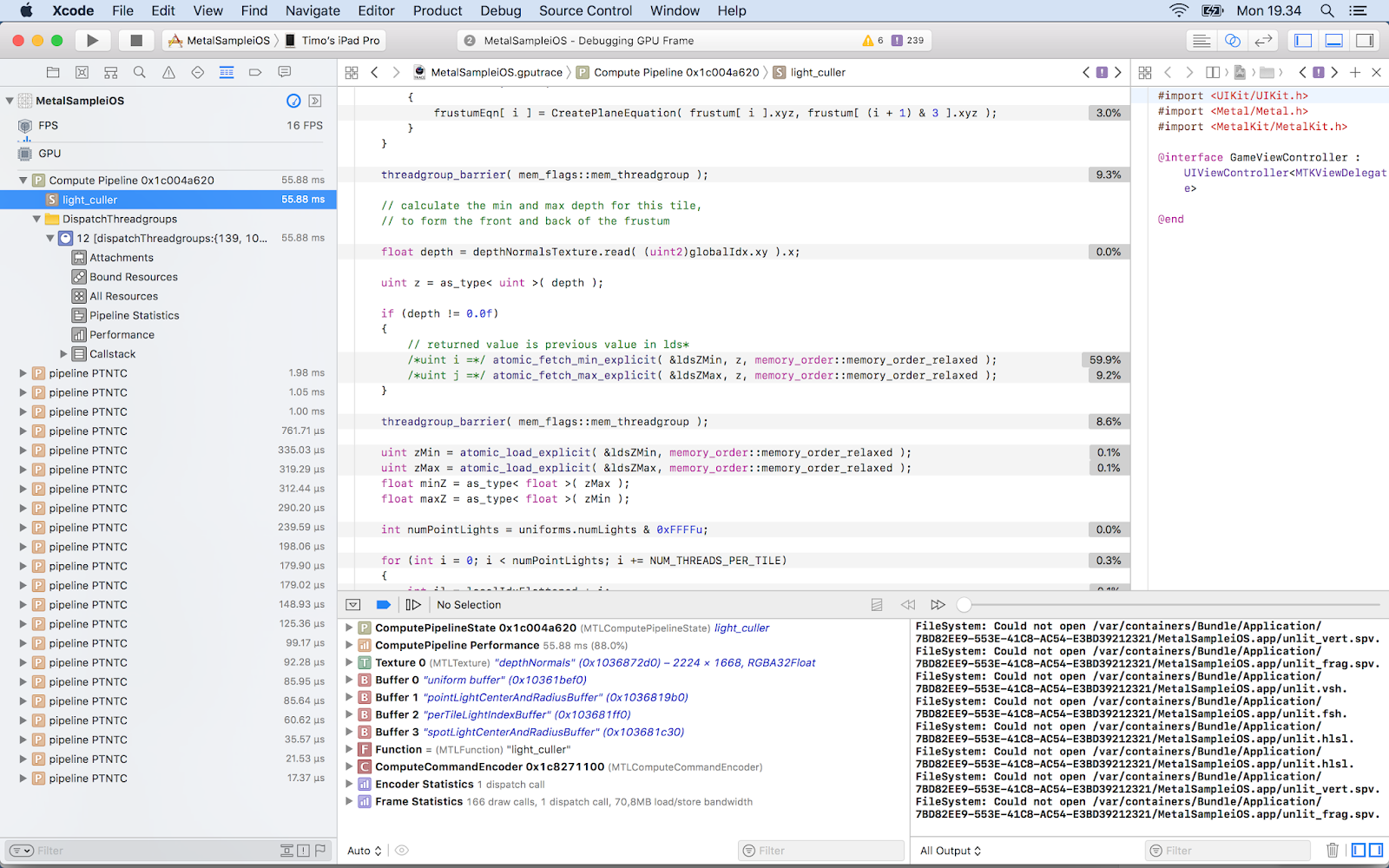
Initial capture

 The starting point doesn't look good, 16 FPS. My Forward+ light culling takes a whopping 55.95 ms and uses 3 600 628 000 ALU ops. Let's see what we can do. From the source line timing view I saw that calculating minimum and maximum z-value for a tile is very slow (59.9 %):


Optimization

What if I don't use depth bounds? Light culling now takes 13.53 ms and 2 234 827 000 ALUs, and I already got 60 FPS. But let's not stop here! I watched the excellent WWDC 2016 talk Advanced Metal Shader Optimization . Xcode's Remarks section warned about buffer preloading. I tried to fix them but couldn't find a way.  My first optimisation was to provide the horizontal and vertical tile counts as uniforms instead of calculating them in the shader. Percentage for those code lines decreased from 1.8 % to 1.4 % and ALU from  2 234 819 000 to 2 208 126 000. The WWDC video suggested to use shorts instead of ints: 2 205 648 000 ALUs.

Future

There's a lot of room for improving the results further, and it's needed. I didn't focus on my material shader in this post because my current engine's shading model is not yet physically based unike my old engine's and I'm not using post processing effects. I use floats in many places where a half would do. I also don't use texture compression, but my engine already supports ASTC so it's just a matter of encoding Sponza textures. My light culler could use parallel reduction or clustered culling.
Metal 2 has some features that could help, like tile shading, function specialization, resource heaps and argument buffers. My plan is to study them next, the concepts are already familiar to me from other graphics APIs. The engine is open source and can be downloaded from GitHub.

2015-05-16

What I've been doing recently

I've been adding graphics features into my new engine slowly because I don't want to write a lot of code that will be replaced by newer APIs. Regarding that, I made an iOS branch into GitHub and I'm learning Metal and already got a textured quad to render. So far the best resource for learning has been http://metalbyexample.com. I also installed Windows 10 preview and VS 2015 RC into my secondary laptop and are learning D3D12. When I have more experience on D3D12 and Metal, I'll merge my renderers into the master branch. I'm also waiting for Vulkan and reading Mantle documentation until it's out.

Writing only engine code would not be so productive, so I'm working on two small games at the moment. The first one is a desktop FPS made using Unity 5.

Some of the assets are downloaded from sites like https://freesound.org, pamargames.com and cgtextures.com but some are done by myself. While the level design/art design/balancing is amateurish, I'm paying special attention to polishing feedback like dealing/receiving damage, transitions, sounds, bullet holes etc. When the game is ready, I'll put the player into my website along with the project folder. I also ditched the built-in MonoDevelop in favour of Xamarin Studio which is faster, but Unity overrides my formatting options.

My other game under construction is a roguelike using my own engine.

I haven't decided on the final design or platform. If my iOS/Metal renderer advances quickly, it would be nice to test the game on my iPhone 5S. Using my own engine for a game development has been productive since it has uncovered some bugs that would have bitten me later on otherwise. Also the new engine's component-based game object system has been nice to use in this game. Some of the used components are TextRendererComponent, SpriteRendererComponent, TransformComponent and AudioSourceComponent.

Next steps in my engine will be a virtual filesystem which enables faster load times by packing multiple files into one. While making the iOS port I'll also be writing NEON SIMD matrix operations. I'm also making a multi-platform scene editor using Qt and its first version will be included in the next engine release.