Showing posts with label graphics. Show all posts

2018-06-19

Optimizing Metal graphics and compute code on an iPad Pro

TL;DR: I got Sponza scene with 2048 point lights running on an iPad Pro at 60 FPS.

My engine has supported Metal for a long time, but I haven't really optimised the Metal renderer before. In this post I go through the process of optimizing Sponza scene with 2048 dynamic point lights from non-interactive frame rates to 60 FPS on an iPad Pro 10.5". I learned a lot and wanted to share my learnings.

Apple's profiling tools

I started my optimisation journey by taking a GPU frame capture in Xcode. Right away I saw that Apple has added a lot of useful features that were missing or less informative in the past. I was delighted to see that it now has GPU counters, timings on source lines and optimisation tips ("Remarks"). Setting a conditional breakpoint to capture a GPU frame at a fixed frame number got me slightly more consistent results than randomly pressing the capture button. A very good feature is the ability to edit a shader during the capture and see the results without restarting. Xcode and its associated tools are still buggy and crash often. I also often got an annoying "No capture boundary detected" error.

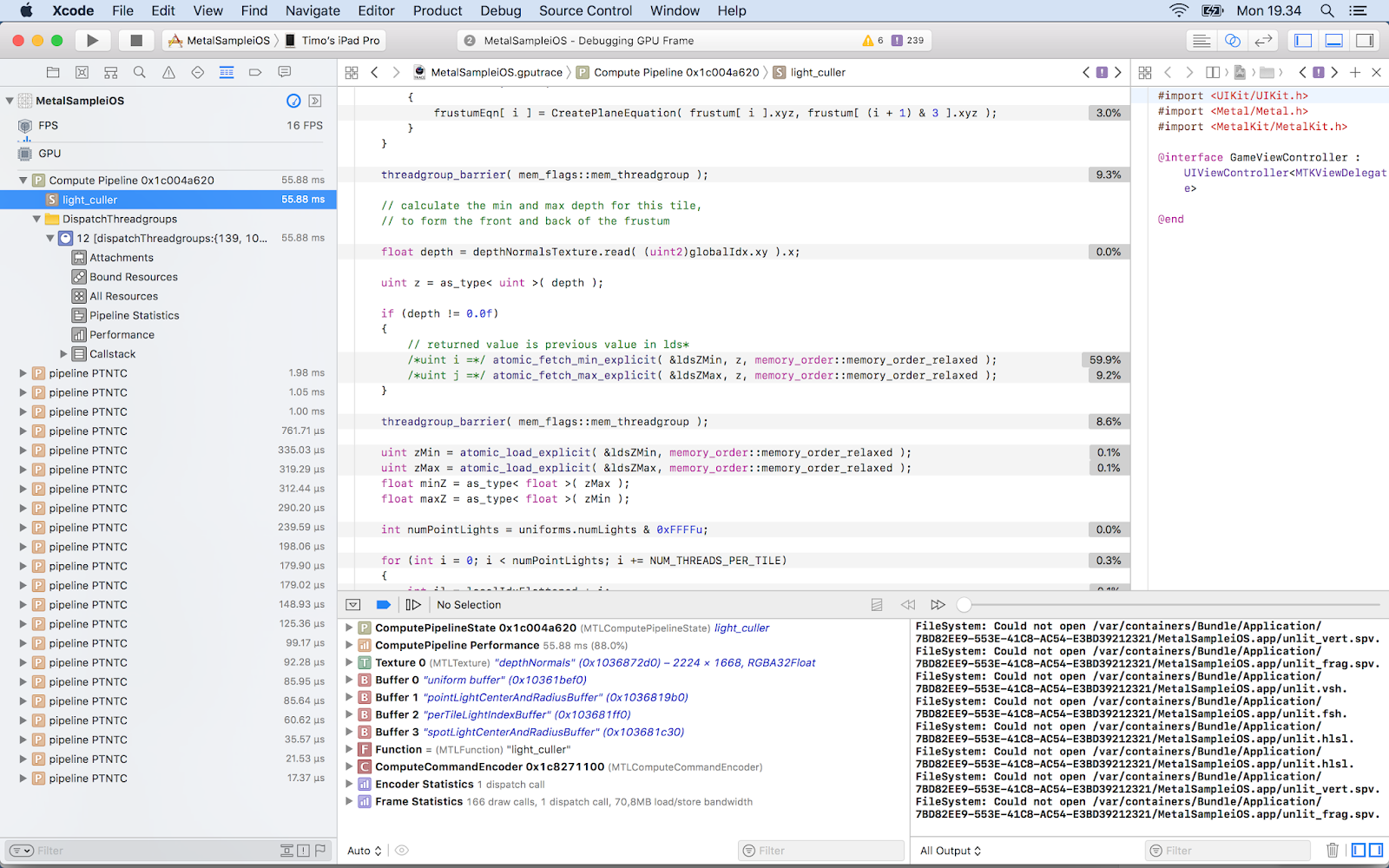
Initial capture

 The starting point doesn't look good, 16 FPS. My Forward+ light culling takes a whopping 55.95 ms and uses 3 600 628 000 ALU ops. Let's see what we can do. From the source line timing view I saw that calculating minimum and maximum z-value for a tile is very slow (59.9 %):


Optimization

What if I don't use depth bounds? Light culling now takes 13.53 ms and 2 234 827 000 ALUs, and I already got 60 FPS. But let's not stop here! I watched the excellent WWDC 2016 talk Advanced Metal Shader Optimization . Xcode's Remarks section warned about buffer preloading. I tried to fix them but couldn't find a way.  My first optimisation was to provide the horizontal and vertical tile counts as uniforms instead of calculating them in the shader. Percentage for those code lines decreased from 1.8 % to 1.4 % and ALU from  2 234 819 000 to 2 208 126 000. The WWDC video suggested to use shorts instead of ints: 2 205 648 000 ALUs.

Future

There's a lot of room for improving the results further, and it's needed. I didn't focus on my material shader in this post because my current engine's shading model is not yet physically based unike my old engine's and I'm not using post processing effects. I use floats in many places where a half would do. I also don't use texture compression, but my engine already supports ASTC so it's just a matter of encoding Sponza textures. My light culler could use parallel reduction or clustered culling.
Metal 2 has some features that could help, like tile shading, function specialization, resource heaps and argument buffers. My plan is to study them next, the concepts are already familiar to me from other graphics APIs. The engine is open source and can be downloaded from GitHub.

2014-07-17

2048 Point Lights @ 60 FPS

Today I released an update to my engine. The most prominent feature
is Forward+ aka Tiled Forward rendering. To my knowledge, no other
open source engine implements it.

Forward+ dates back to 2012 and is used in several AAA games like DiRT Showdown, Ryse (partially) and The Order: 1886. Its main advantages are support for MSAA, transparency and multiple BRDFs. The algorithm works by culling lights against a screen-space grid where cells are for example 16x16 pixels. It stores a per-tile list of light indices that are then used in shading. Culling is done with a compute shader and it uses depth texture to get each tile's extents. My engine does a depth-pass in any case, because it's needed for SSAO etc.

The implementation I did is based on AMD's ForwardPlus11 sample. However, the sample is D3D11 and uses deprecated D3DX libs, but my implementation also supports OpenGL 4.3. I was able to render 2048 point lights at 60 FPS in Sponza scene on my year-old MacBook Pro (GeForce 750M). All the surfaces use Cook-Torrance with normal maps.

If you want to implement it yourself or just test it, you can download my engine. Here's some API mappings from HLSL to GLSL:
gl_WorkGroupID: SV_GroupID
gl_LocalInvocationID: SV_GroupThreadID
gl_GlobalInvocationID: SV_DispatchThreadID
uintBitsToFloat(): asfloat()
floatBitsToUint(): asuint()


Here's some useful links:
http://www.cse.chalmers.se/~olaolss/main_frame.php?contents=publications
http://aras-p.info/blog/2012/03/27/tiled-forward-shading-links/
http://diaryofagraphicsprogrammer.blogspot.fi/2012/04/tile-based-deferred-and-forward.html
http://articles.pjblewis.com/
http://focus.gscept.com/2014ip19/

So, what's next for Aether3D? I'll add spot lights soon and for the next release my focus will be in fixing open bugs and adding unit tests and support for CMake. I'm also planning to dogfood my engine this year by making a simple first-person game. Also, I'm working on an editor in Qt and C++. I'll blog more about them when they are more mature.